
API Key Management
Configure API keys for AI providers to enable TalkCody's AI features
API Keys
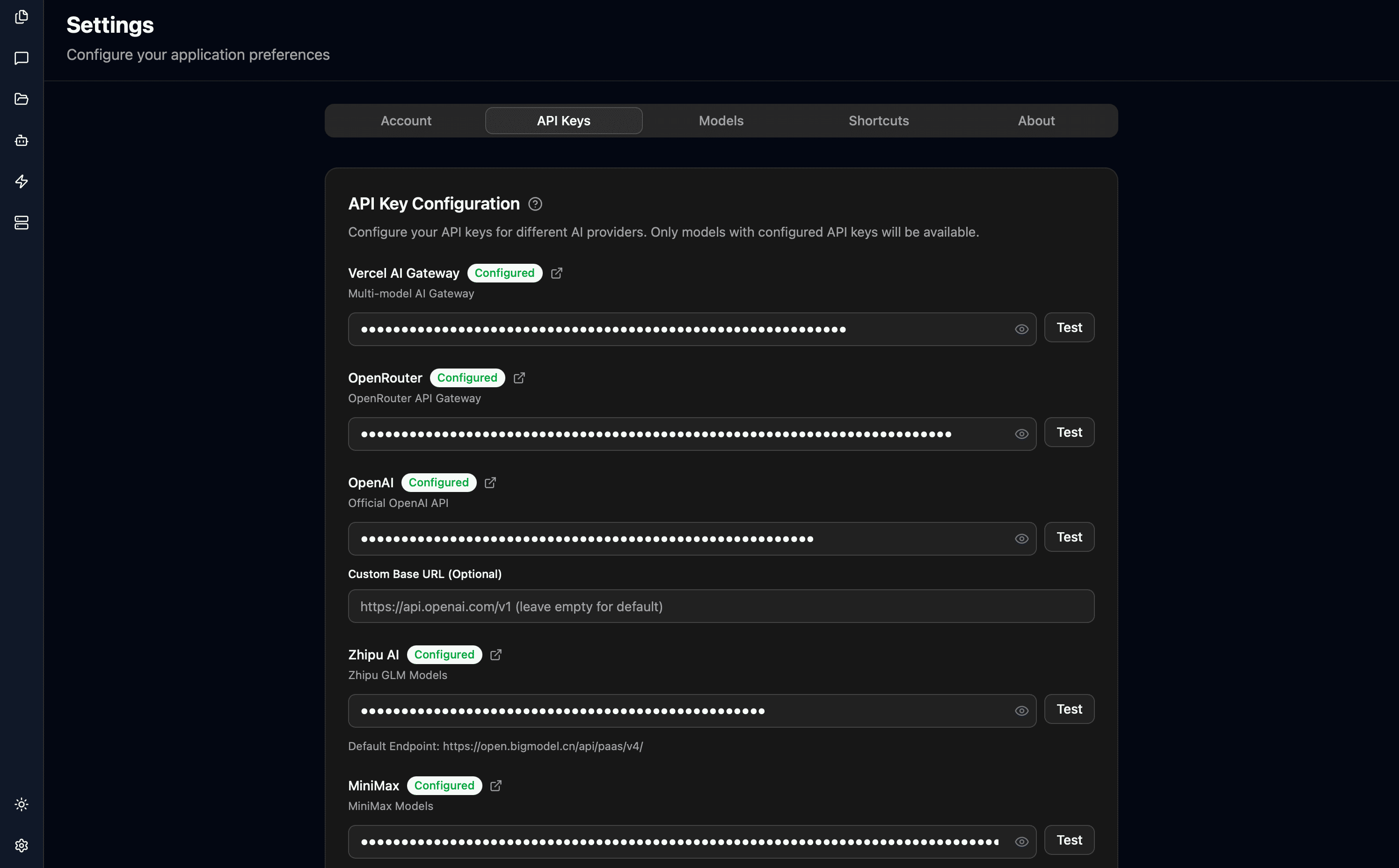
TalkCody supports multiple AI providers, each requiring their own API key:
- OpenAI - GPT models
- Anthropic - Claude models
- Google - Gemini models
- Groq - Groq models
- OpenRouter - Gateway supporting 500+ models
- Vercel AI Gateway - Gateway supporting 100+ models
- VolcEngine - VolcEngine Doubao models
- Alibaba Qwen - Qwen models
- Zhipu AI - GLM models
- Z.AI - GLM models (International)
- MiniMax - MiniMax models
- DeepSeek - DeepSeek models
- Moonshot - Kimi models
- Ollama - Local models (no key needed)
- LM Studio - Local models (no key needed)
TalkCody supports any third-party provider compatible with OpenAI or Anthropic APIs. Simply enter the corresponding API key and optional custom Base URL.
You need at least one API key configured to use TalkCody. Multiple keys allow you to use different models and providers.
Don't have an API key? Try OpenRouter or Vercel AI Gateway, which provide access to hundreds of models through a single API key, including some free models.
To use the free Web Search Tool, configure your Tavily API key first. Tavily provides 1000 free search requests per month.
To use the free voice input feature, configure your Eleven Labs API key first. Eleven Labs provides 10,000 characters of free voice synthesis per month.
Adding API Keys
Open Settings
- Open the Settings page
- Navigate to the API Keys section
Enter Provider API Key
- Paste your API key in the input field
- For OpenAI and Anthropic compatible providers, enter the base URL (if needed)
Test Connection
- Click Test Key to verify it works
- Check that the connection succeeds
Getting API Keys
Vercel AI Gateway
Multi-model AI Gateway that provides access to multiple AI provider models through a single interface.
Steps to obtain:
- Visit Vercel AI Gateway
- Sign in or register with your Vercel account
- Create a new project in the Dashboard
- Go to project settings and find AI Gateway configuration
- Generate a Gateway API Key
- Copy the key and paste it into TalkCody's Vercel AI Gateway field
OpenRouter
OpenRouter API Gateway that aggregates multiple AI providers, providing access to 100+ models through a single API.
Steps to obtain:
- Visit openrouter.ai
- Click "Sign In" in the top right corner to login or register
- After logging in, click your avatar to enter account settings
- Select "Keys" from the left menu
- Click "Create Key" to create a new key
- Name your key (e.g., "TalkCody") and click confirm
- Copy the generated key (format:
sk-or-v1-...) - Paste it into TalkCody's OpenRouter field
OpenRouter offers some free models (like DeepSeek Chat), suitable for testing and light usage.
OpenAI
Official OpenAI API, providing advanced language models like GPT-4 and GPT-4 Turbo.
Steps to obtain:
- Visit platform.openai.com
- Click "Sign up" to register or "Log in" to sign in
- Complete account verification (may require phone number)
- After logging in, click your avatar in the top right → "API keys"
- Click "Create new secret key"
- Name your key and click "Create secret key"
- Copy the key immediately (format:
sk-..., cannot be viewed again after closing) - Paste it into TalkCody's OpenAI field
New accounts typically have $5 free credit. Ensure your account has sufficient balance or a payment method attached before use.
Custom Base URL: If using a proxy server or OpenAI-compatible third-party service (like MiniMax), enter the corresponding endpoint address in the "Custom Base URL" field.
Anthropic
Official Anthropic Claude API, providing Claude 3.5 Sonnet, Opus, Haiku and other models.
Steps to obtain:
- Visit console.anthropic.com
- Click "Sign up" to register a new account
- Complete email verification and account setup
- After logging in, enter the Console Dashboard
- Click "API Keys" in the left menu
- Click the "Create Key" button
- Enter a key name and confirm creation
- Copy the generated key (format:
sk-ant-...) - Paste it into TalkCody's Anthropic field
Custom Base URL: If you need to use a proxy server, you can configure a custom endpoint in the "Custom Base URL" field.
Google AI
Google AI Studio's Gemini series models, supporting text and multimodal capabilities.
Steps to obtain:
- Visit aistudio.google.com
- Sign in with your Google account
- Agree to the terms of service
- Click "Get API key" in the left menu
- Click "Create API key in new project" or select an existing project
- Copy the generated key (format:
AIza...) - Paste it into TalkCody's Google AI field
Google AI offers generous free quota: 15 requests per minute, 1500 requests per day, no credit card required.
Groq
Groq provides fast inference APIs for LLMs.
Steps to obtain:
- Visit console.groq.com
- Sign in or register a Groq account
- In the Console, open the API Keys page and click "Create API Key"
- Name the key and confirm
- Copy the generated key (format:
gsk_...) - Paste it into TalkCody's Groq field
Groq speech-to-text is currently free to use.
MiniMax
MiniMax's large language model service, supporting text generation and conversation capabilities.
Steps to obtain:
- Visit platform.minimaxi.com
- Click register or login in the top right corner
- Complete account registration and verification
- After logging in, enter the user center
- In the left menu, select "Basic Information" → "Interface Key"
- Or directly visit the Interface Key page
- Click "Create Key" or view existing keys
- Copy the API Key
- Paste it into TalkCody's MiniMax field
MiniMax offers free trial credits. New users receive a certain number of free API calls after registration.
Zhipu AI
Zhipu AI's GLM series models, including GLM-4 and other Chinese-optimized models.
Steps to obtain:
- Visit open.bigmodel.cn
- Click "Register" to create an account (supports phone number registration)
- Complete identity verification (may be required)
- After logging in, enter the console
- Go to the "API Key Management" page
- Click "Create API Key"
- Copy the generated key
- Paste it into TalkCody's Zhipu AI field
Ollama
Locally running open-source models, completely offline, privacy-focused.
Configuration steps:
- Visit ollama.com to download and install Ollama
- Open terminal and download a model:
ollama pull llama2 # or other models like codellama, mistral, etc. - Ensure Ollama service is running
- TalkCody will automatically detect local Ollama
- No API key needed, directly select Ollama models in model settings
Ollama is completely free and supports offline use, but requires sufficient local computing resources (8GB+ RAM recommended).
DeepSeek
DeepSeek's high-performance large language models, offering powerful code generation and reasoning capabilities at highly competitive prices.
Steps to obtain:
- Visit platform.deepseek.com
- Click "Sign Up" or "Login" in the top right corner
- Complete email verification and account setup
- After logging in, enter the console
- Select "API Keys" from the left menu
- Click "Create new API key"
- Name your key and confirm
- Copy the generated key (format:
sk-...) - Paste it into TalkCody's DeepSeek field
DeepSeek offers highly competitive pricing. The DeepSeek-V3 model performs close to GPT-4 but costs only 1/10 of the price. New users receive free credits upon registration.
DeepSeek's DeepSeek-R1 model is designed for complex reasoning tasks, excelling in mathematics, code, and logical reasoning.
Moonshot
Moonshot's Kimi large language model, featuring ultra-long context windows, supporting long document processing and complex conversations.
Steps to obtain:
- Visit platform.moonshot.cn
- Click "Login" or "Register" in the top right corner
- Complete registration and verification with phone number
- After logging in, enter the console
- Select "API Key Management" from the left menu
- Click "New" to create a new key
- Name your key and confirm
- Copy the generated key (format:
sk-...) - Paste it into TalkCody's Moonshot field
Moonshot offers up to 128K context window, especially suitable for processing long documents. New users receive free credits upon registration.
Moonshot supports TalkCody's Coding Plan feature. You can select Moonshot models in Agent configuration for code planning.
VolcEngine
VolcEngine is ByteDance's cloud service platform, providing Doubao (豆包) series large language models with powerful Chinese language understanding and generation capabilities.
Steps to obtain:
- Visit console.volcengine.com
- Click "Login" or "Register" in the top right corner to create an account
- Complete identity verification (enterprise or individual)
- After logging in, enter the console
- Search for "Ark" in the top search bar or visit the Ark Platform
- Select "API Key Management" from the left menu
- Click "Create API Key"
- Name your key and select permission scope
- Copy the generated key
- Paste it into TalkCody's VolcEngine field
VolcEngine Ark Platform offers multiple model versions including Doubao-pro and Doubao-lite. New users receive free trial credits upon registration.
Before using VolcEngine, you need to create an inference endpoint in the Ark Platform's "Online Inference" section. After obtaining the endpoint ID, you can use it in TalkCody.
Alibaba Qwen
Alibaba Cloud's Qwen (通义千问) series large language models, optimized for Chinese language scenarios with powerful text understanding and generation capabilities.
Steps to obtain:
- Visit dashscope.aliyun.com
- Click "Login" in the top right corner to sign in with your Alibaba Cloud account
- Complete identity verification (if not already done)
- After logging in, enter the console
- Select "API-KEY Management" from the left menu
- Click "Create New API-KEY"
- Name your key and select the business space
- Copy the generated key (format:
sk-...) - Paste it into TalkCody's Alibaba Qwen field
Alibaba Cloud Bailian Platform offers generous free quotas. New users can receive millions of free token credits, sufficient for daily development and testing.
Qwen supports TalkCody's Coding Plan feature. You can select Qwen models in Agent configuration for code planning.
LM Studio
LM Studio is a desktop application that lets you run open-source large language models locally, providing a graphical interface to manage and run models.
Configuration steps:
- Visit lmstudio.ai to download and install LM Studio
- Open the LM Studio application
- Search and download your desired model in the "Discover" tab
- After download completes, go to the "Developer" tab
- Click "Start Server" to start the local server
- Server runs by default at
http://localhost:1234 - No API key needed in TalkCody, simply select LM Studio models
LM Studio is completely free and supports offline use, providing a friendly graphical interface to manage local models. Supports Apple Silicon acceleration and NVIDIA GPU acceleration.
LM Studio supports GGUF format models and can download many open-source models from Hugging Face, such as Llama, Mistral, Phi, and more.
Tavily
Search API designed specifically for AI agents and large language models, providing accurate, real-time web search results.
Steps to obtain:
- Visit tavily.com
- Click "Get API Key" or "Sign Up"
- Register with your email
- Complete email verification
- After logging in, enter the Dashboard
- View your key in the "API Keys" section
- Copy the API key
- Paste it into TalkCody's Tavily field
Tavily offers 1000 free search requests per month, suitable for individual developers.
Eleven Labs
Leading AI voice synthesis platform, providing high-quality text-to-speech and voice cloning features.
Steps to obtain:
- Visit elevenlabs.io
- Click "Sign Up" in the top right corner
- Register with Google account or email
- Complete account creation and verification
- After logging in, click your avatar in the top right
- Select "Profile + API key"
- Click the eye icon in the API Key section to view the key
- Copy the API key (format: long string of numbers and letters)
- Paste it into TalkCody's Eleven Labs field
Eleven Labs free tier provides 10,000 characters of voice synthesis per month, usable for TalkCody's voice features.
Serper
Google Search API service that provides fast and accurate web search results, designed for AI applications and automation.
Steps to obtain:
- Visit serper.dev
- Click "Get API Key" or "Sign Up"
- Register with your email or Google account
- Complete email verification
- After logging in, enter the Dashboard
- View your API key in the dashboard
- Copy the API key
- Paste it into TalkCody's Serper field
Z.AI
Z.AI provides advanced language models from the GLM family, including high-performance models like GLM-4.7.
Steps to obtain:
- Visit z.ai/model-api
- Click "Sign Up" to register an account or "Login" to sign in
- Complete email verification and account setup
- After logging in, enter the console
- Select "API Keys" from the left menu
- Click "Create API Key"
- Copy the generated key
- Paste it into TalkCody's Z.AI field
TalkCody supports Z.AI's Coding Plan feature.
Once you've configured your API keys, you're ready to start using TalkCody's AI features!