
Use Claude Models with Claude Pro/Max Subscription
Use Claude models with your Claude Pro/Max subscription
This feature has been deprecated! There is a risk of your account being banned by Anthropic.
If you already have a Claude Pro ($20/month) or Claude Max ($100-200/month) subscription, you can use your subscription quota directly in TalkCody without purchasing additional API credits.
How It Works
TalkCody uses the official OAuth authentication provided by Anthropic, which is the same authentication method used by official Claude clients (claude.ai, Claude desktop app).
After logging in via OAuth, TalkCody can use the model quota included in your subscription, including Claude Sonnet, Claude Opus, and other models.
Terms of Use & Disclaimer
Important: Please read the following terms carefully before using this feature.
This feature is designed for personal development use only, limited to your own Claude Pro/Max subscription. By using this feature, you agree to:
Permitted Uses
- ✅ Personal coding assistance and productivity enhancement
- ✅ Compliance with Anthropic's rate limits and usage policies
- ✅ Adherence to Anthropic Usage Policy
Prohibited Uses
- ❌ Commercial API resale or white-label services
- ❌ High-concurrency automated requests beyond personal use
- ❌ Using one subscription to serve multiple users
- ❌ Any behavior that violates Anthropic's Acceptable Use Policy
This feature uses Anthropic's official OAuth authentication (the same method as official Claude clients). However, users are responsible for ensuring their usage complies with Anthropic's Terms of Service.
Disclaimer
- This project is not affiliated with Anthropic in any way
- Claude, Claude Pro, Claude Max are trademarks of Anthropic
- This is an independent open-source project, not endorsed, sponsored, or affiliated with Anthropic
- Violation of Anthropic's Terms of Service may result in account restrictions
For production or commercial use, please purchase official API credits through the Anthropic API.
Configuration Steps
Open Settings
- Launch TalkCody
- Click the Settings icon on the left
- Navigate to the API Keys page
- Find the Anthropic (Claude) section
Login with Claude
In the Anthropic settings area, click the Login with Claude button.
The system will display an authorization URL and automatically open it in your browser.
Complete Browser Authorization
- On the opened browser page, log in with your Claude Pro/Max account
- Review the scope of permissions requested
- Click the Authorize button to grant authorization
Paste Authorization Code
After successful authorization, the browser will display an authorization code (format like code#state).
- Copy the complete authorization code
- Return to TalkCody
- Paste the authorization code in the popup input box
- Click Confirm
Verify Connection
After successful authorization, you will see:
- Connection status shows as Connected
- You can start using Claude models for conversations
After successful OAuth login, tokens will refresh automatically, no need to log in repeatedly.
View Usage
TalkCody provides a Usage Dashboard that allows you to monitor your Claude Pro/Max subscription usage in real-time.
Access Usage Dashboard
- Click the Usage icon in the left navigation bar
- Select the Claude tab to view Claude usage
Usage Metrics Explained
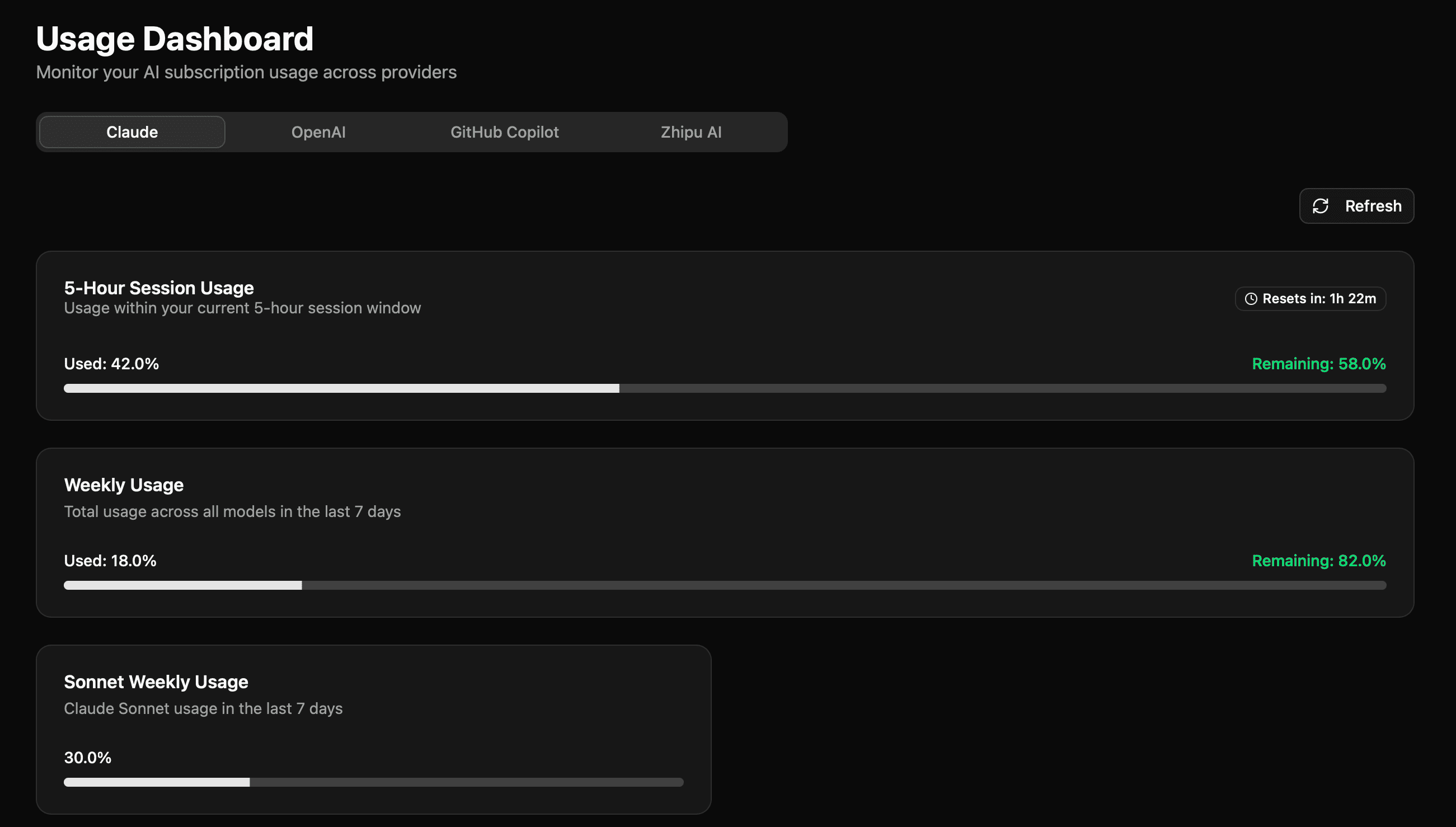
The dashboard displays the following metrics:
5-Hour Session Usage
- Content: API usage percentage in the last 5 hours
- Reset Time: Time until next reset
- Color Indicators:
- Green (< 50%): Normal usage
- Yellow (50-80%): Moderate usage
- Orange (80-95%): High usage
- Red (>95%): Approaching limit
7-Day Weekly Usage
- Content: API usage percentage in the last 7 days
- Reference Metric: Helps you understand your overall weekly usage
Additional Usage (if applicable)
- Current Spending: Additional fees already used
- Budget Limit: Additional fee cap you've set
- Progress Bar: Shows additional fee usage progress
Refresh Usage
Click the Refresh button in the top right corner to manually update usage data.
FAQ
What's the difference between OAuth authentication and API Key?
| Method | Pros | Cons |
|---|---|---|
| OAuth (Subscription) | Use existing subscription, no additional payment needed | Personal use only, rate limited |
| API Key | Higher rate limits, suitable for commercial use | Requires separate API credit purchase |